
IN THIS GUIDE
- Why EHS migrations are different
- What is an audit trail in EHS data?
- The 5-phase EHS data migration process
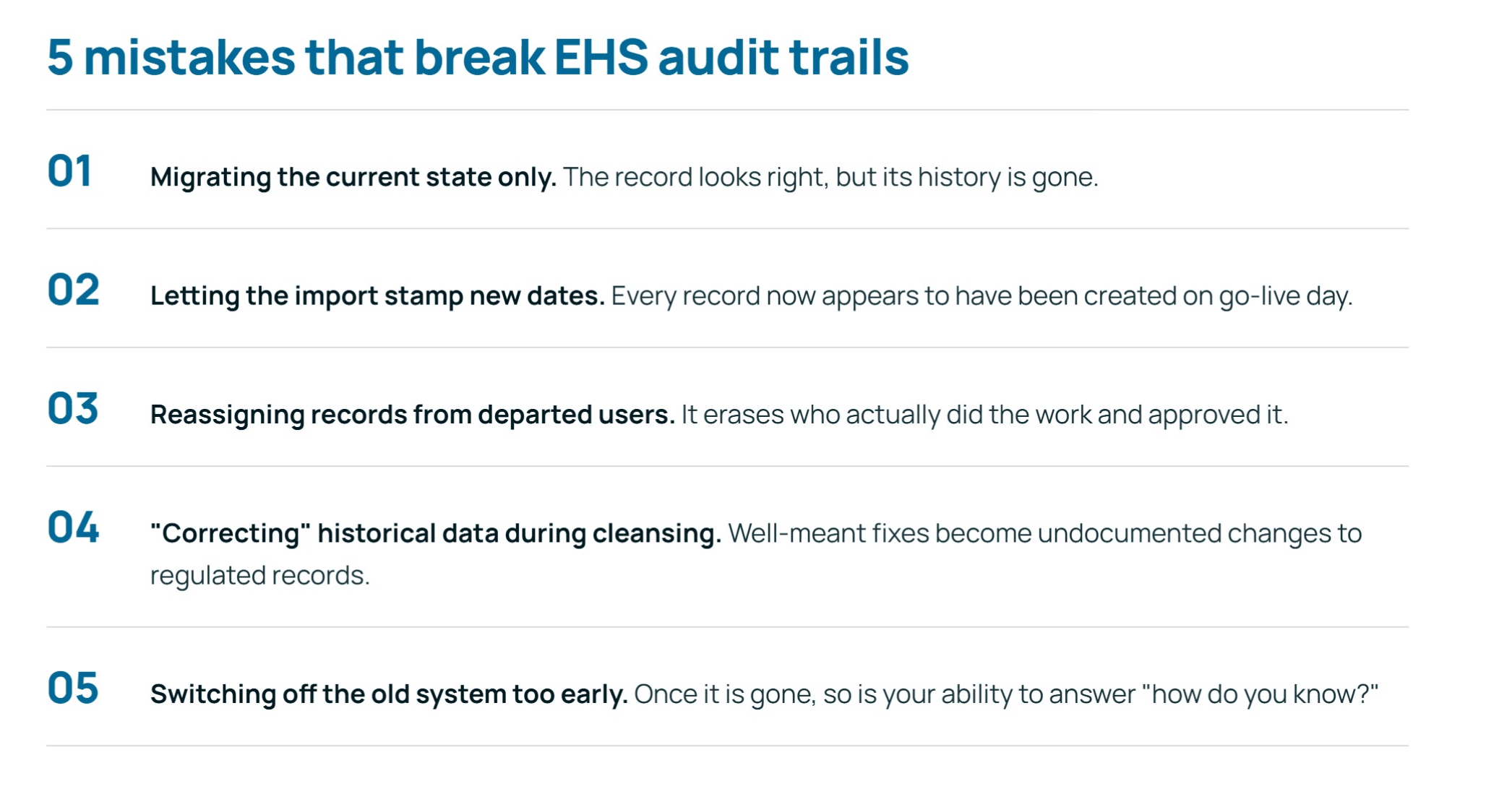
- 5 mistakes that break EHS audit trails
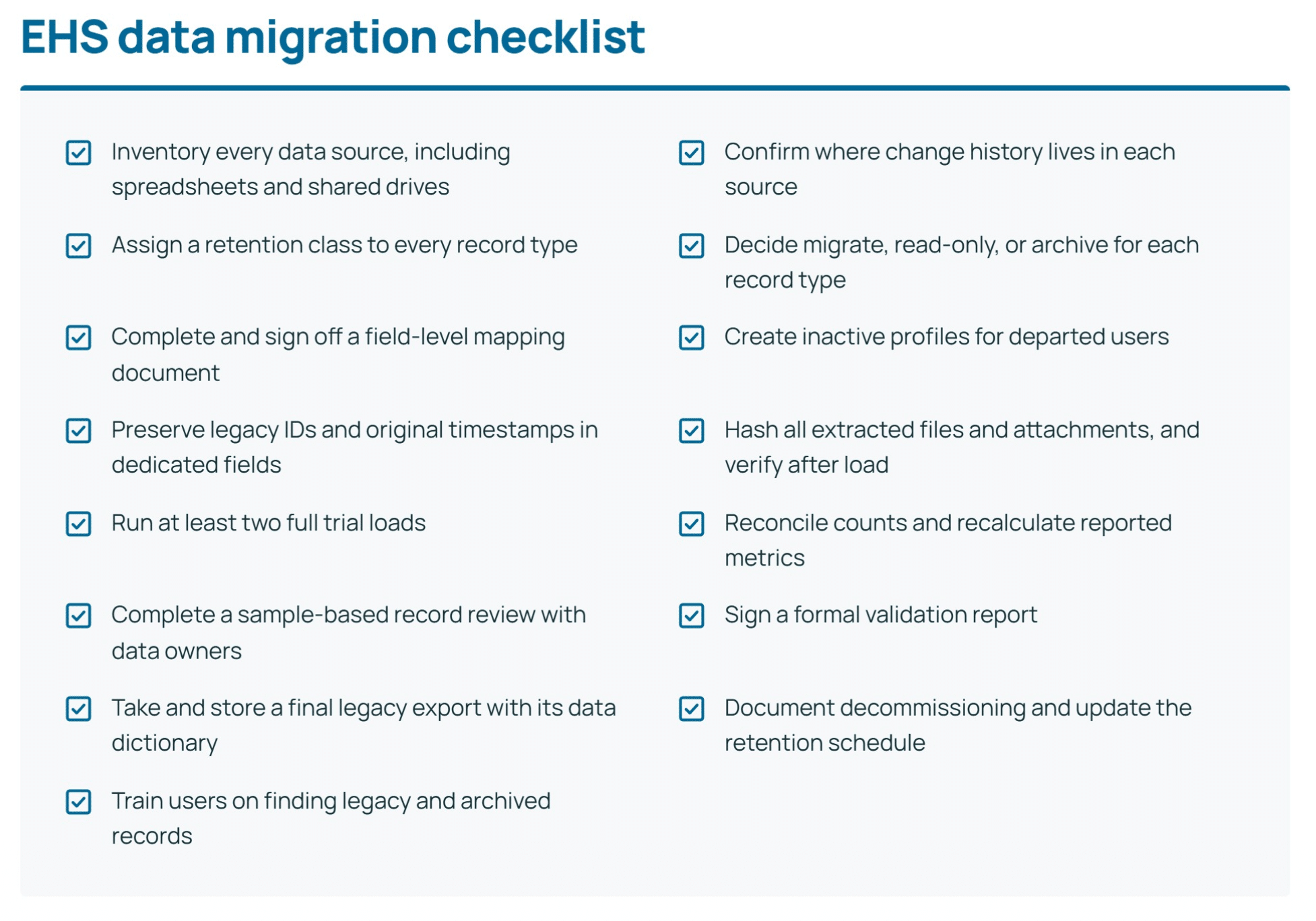
- EHS data migration checklist
- FAQ
Why EHS migrations are different
An EHS data migration succeeds when an auditor can pick any record from 2014 and see who created it, who changed it, and when, in the new system, without anyone opening the old one. Everything else is secondary.
Most software migrations are judged on whether the data arrived. EHS migrations are judged on whether thedata’s history arrived. An incident report without its revision trail, or an exposure record stripped of its original timestamps, can be as damaging in an inspection as a missing record. Some of these records must be kept for decades, long after the system that created them is gone.
That is why so many EHS teams stay on aging platforms and spreadsheets for years longer than they want to. The fear is reasonable. But it is a planning problem, not an unsolvable one. This playbook walks through five phases that keep record history intact, the pitfalls that catch teams out, and a checklist you can take into your own project.
What is an audit trail in EHS data?
An audit trail is the record’s provenance: proof that the data is what it claims to be and has not been altered without a trace. For EHS data, that usually means five things travel with every record:
- Original creation metadata: who created the record, when, and at which site.
- Change history: every edit, with the old value, new value, user and timestamp.
- Approvals and sign-offs: who reviewed, approved or closed it, and in what order.
- Attachments: photos, permits, lab results, signed forms and witness statements, linked to the right record.
- Relationships: the incident tied to its investigation, its root cause, its corrective actions and their verification.
How long must EHS records be kept?*
Retention periods make this harder, because some records outlive several generations of software. A few common
examples:
| Record type | Typical retention | Reference |
| Employee exposure records | 30 years | OSHA 29 CFR 1910.1020 |
| Employee medical records | Duration of employment + 30 years | OSHA 29 CFR 1910.1020 |
| OSHA 300, 300A and 301 injury logs | 5 years after the calendar year | OSHA 29 CFR 1904.33 |
| Hazardous waste manifests (generator) | 3 years | EPA 40 CFR 262.40 |
*Requirements vary by jurisdiction, permit and industry, so confirm yours with your compliance team.
The practical takeaway: a migration that moves only the current state of each record is not a complete migration.
The 5-phase EHS data migration process
A migration that keeps its audit trail intact moves through five phases in order: inventory, map and decide, transfer, validate, then cut over.

Phase 1: What EHS data do you have? Inventory every source
You cannot protect an audit trail you have not found. A decade of EHS data rarely lives in one place. Expect a legacy EHS platform or two, site-level spreadsheets, shared drives full of scanned forms, an LMS for training, and
the occasional Access database someone built in 2012.
For each source, capture:
- What it holds: record types, sites, and date range.
- Volume: record counts and attachment storage, per record type.
- Where history lives: is there a native audit log table, a separate history export, or only “last modified by”?
- Retention class: which regulatory or internal retention rule applies to each record type.
- Owner: the person who can answer questions about the data and sign off on its migration.
The third item is where most surprises hide. Many older systems store change history in a separate table, a log file, or not at all. Find out now, while you still have vendor support and people who remember how the system was configured.
By the end of this phase you should have a single data inventory that legal, compliance and IT have all reviewed.
Phase 2: What should you migrate, lock as history, or archive?
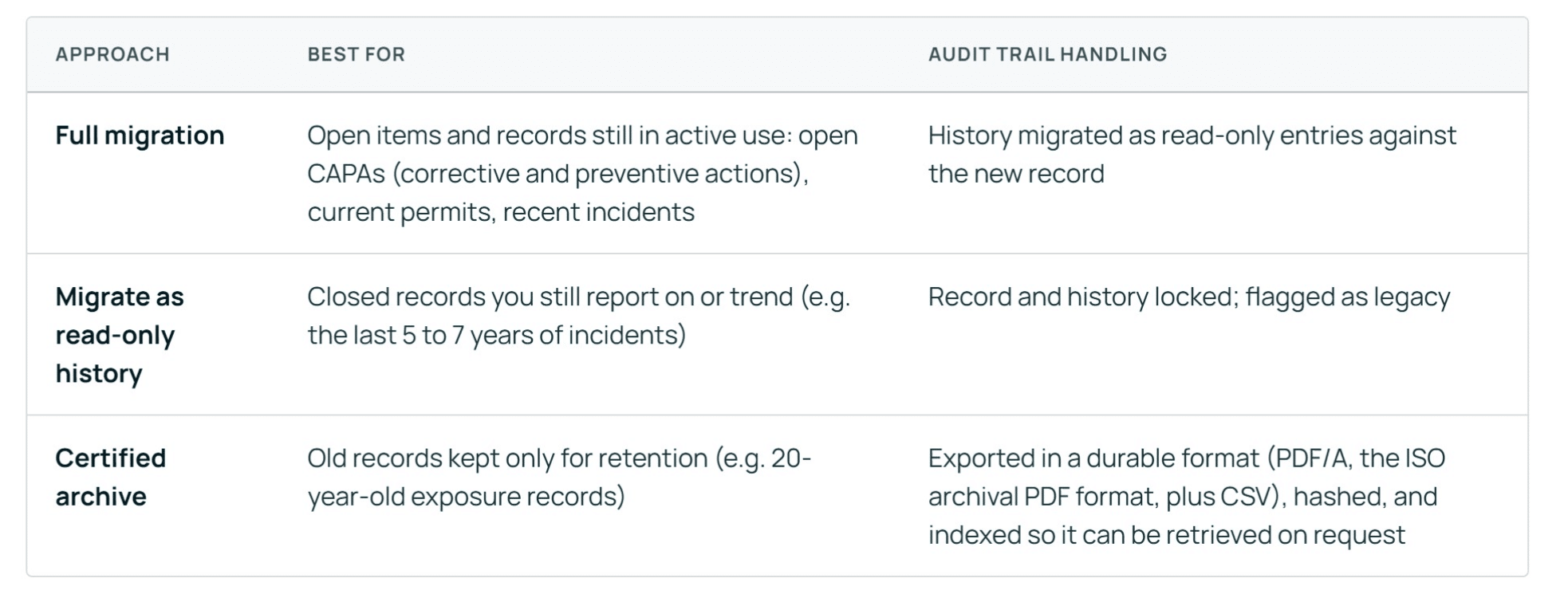
Not every record needs to become a live, editable record in your new platform. The decision for each record type is one of three:
Once you know what is moving, build a field-level mapping document. Every legacy field gets a destination, a transformation rule, or an explicit decision to drop it, with a reason. Pay special attention to:
- Pick lists and classifications that have changed over the years. An injury type renamed in 2018 should map consistently, not split into two categories.
- Users who have left. Departed employees still need to appear as the author or approver of their records. Create inactive user profiles rather than reassigning their records.
- Sites and org units that were merged, sold or renamed.
On cleansing, follow one firm rule: fix structure, not substance. Standardizing date formats or de-duplicating site
names is fine. Changing what a historical record says is not. If a 2016 incident was misclassified, that correction
belongs in the new system as a documented change, not silently applied during migration.
Phase 3: How do you preserve audit trails during an EHS data migration?
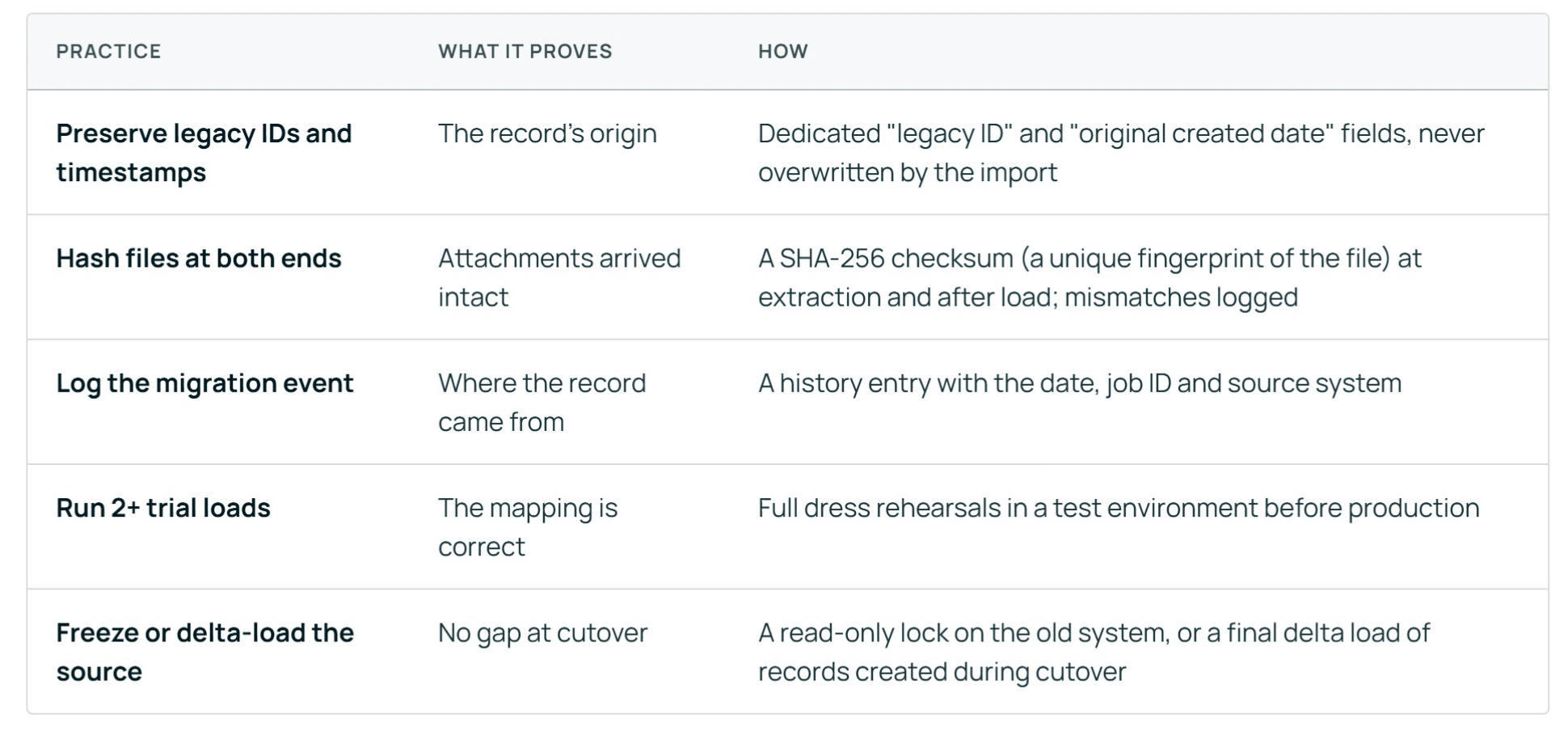
To preserve audit trails during an EHS data migration, keep each record’s original IDs and timestamps, migrate its full change history as read-only entries, and checksum every file before and after loading. Then log the migration itself as an event on each record. Together, these maintain the chain of custody: proof that nothing changed between the old system and the new one.
EXAMPLE
A 2016 incident report moves with its original creator, its three edits, the investigator’s sign-off and its 12 photos. Each photo’s checksum matches on both sides, and one new history entry reads “Migrated from [legacy system], [date], job [ID].”
Phase 4: How do you prove the migration is complete?
Validation turns “we think it worked” into a signed record that it did. Check at three levels, and keep the results.
- Counts: record totals per record type, per site, per year, matched between source and target. Any variance is explained in writing.
- Reported metrics: recalculated metrics match what was reported at the time. If your 2019 TRIR (total recordable incident rate) or lost-time case count changes after migration, you have a mapping problem, and a potential reporting problem.
- Sample-based record review: a statistically meaningful sample of records compared field by field, including history, approvals and attachments. Weight the sample toward high-risk record types such as serious incidents, regulatory submissions and exposure monitoring.
Involve the people who own the data, not only the project team. A site EHS manager will spot a misrouted incident in seconds that a migration analyst would never notice.
Close the phase with a formal validation report signed by data owners and compliance. That report is the first thing to hand an auditor who asks how you know the migration was complete.
Phase 5: When can you switch off the old system?
Go-live is not the end of the project. The legacy system holds the last evidence of where your data came from, so retire it deliberately.
- Run in parallel briefly, if you can. A short read-only window on the old system lets users confirm the new one
has what they expect - Take a final, complete export of the legacy database, including audit tables, before it is switched off. Store it
with its hashes and a data dictionary so someone can interpret it in ten years. - Document the decommissioning: the date, who approved it, where the archive lives, and how to retrieve a
record from it. - Update your records retention schedule to point to the new system and the archive, by record type.
Then train people on how legacy records appear in the new platform. If users cannot tell a migrated 2015 incident from a native one, or do not know where to find archived exposure data, the audit trail exists on paper but fails in practice.
FAQ
How long does an EHS data migration take?
It depends on the number of source systems, the record volume, and how much history has to move. Build in time for at least two full trial loads and a validation review with data owners before go-live.
How much does EHS data migration cost?
The main cost drivers are the number and age of source systems, data quality, attachment volume, and how deep validation needs to go. Archiving older records instead of fully migrating them is often the biggest lever for reducing cost.
Should I migrate all historical EHS data or only recent years?
Migrate open and actively used records in full, recent closed records as read-only history, and older retention-only records to a certified archive. Your retention requirements, not convenience, set the minimum for what must stay retrievable.
How do I migrate paper or scanned EHS records?
Scan them to a searchable archival format such as PDF/A, index each file by record type, site and date, and link it to the matching digital record where one exists. Keep the paper originals until compliance confirms the scans meet your retention requirements.
What if my legacy system has no audit log?
Export whatever history exists, such as created and modified fields, approval records and attached correspondence. Document the gap in your validation report and archive the legacy database as-is. Being clear about the limitation is better than implying a history that never existed.
Do privacy laws affect migrating employee health and exposure records?
They can. Medical and exposure records hold personal health information that may be covered by laws such as PIPEDA in Canada or GDPR in the EU. Limit access during the migration, encrypt data in transit, and involve your privacy officer early.
Move forward without leaving your history behind
Ten years of EHS records are more than a compliance burden. They are your trend lines, your lessons learned, and your evidence that the program works. A migration done well keeps all of that intact and makes it more useful, because the data finally sits in one place where it can be reported on.
The teams that get this right treat the audit trail as a requirement from day one, not a cleanup task at the end. Plan for history, prove integrity at every handoff, and retire the old system on your terms.
Planning a move to a new EHS platform?
Talk to the IsoMetrix team about how we approach data migration, from legacy inventory to validated go-live